I Built a Voice-Enabled AI Strategy Architect That Generates Bespoke Campaign Dashboards – Here's What Made It Possible
How agentic AI turned Google’s Gemini 3 Pro hackathon experiment into a functional and innovative strategy tool for under-resourced charities.


How agentic AI turned Google’s Gemini 3 Pro hackathon experiment into a functional and innovative strategy tool for under-resourced charities.
Every charity deserves a professional communications strategy. The problem is that developing one typically takes (at least!) 15–20 hours of skilled work – time and expertise that smaller non-profits simply don't have. So they skip strategy entirely, jump straight to tactics, and campaigns underperform.
In deciding to take past in Google’s Vibe Code with Gemini 3 Pro hackathon last week, I set out to test how far this latest 'ground-breaking' AI model could actually close this gap. Not to just generate text, but deliver something approaching agency-quality output, complete with the strategic rigour, sector knowledge, and practical constraints that real charity communications require. (In the past, I’ve founded a charity as well as taken on senior interim leadership roles and served as a trustee.)
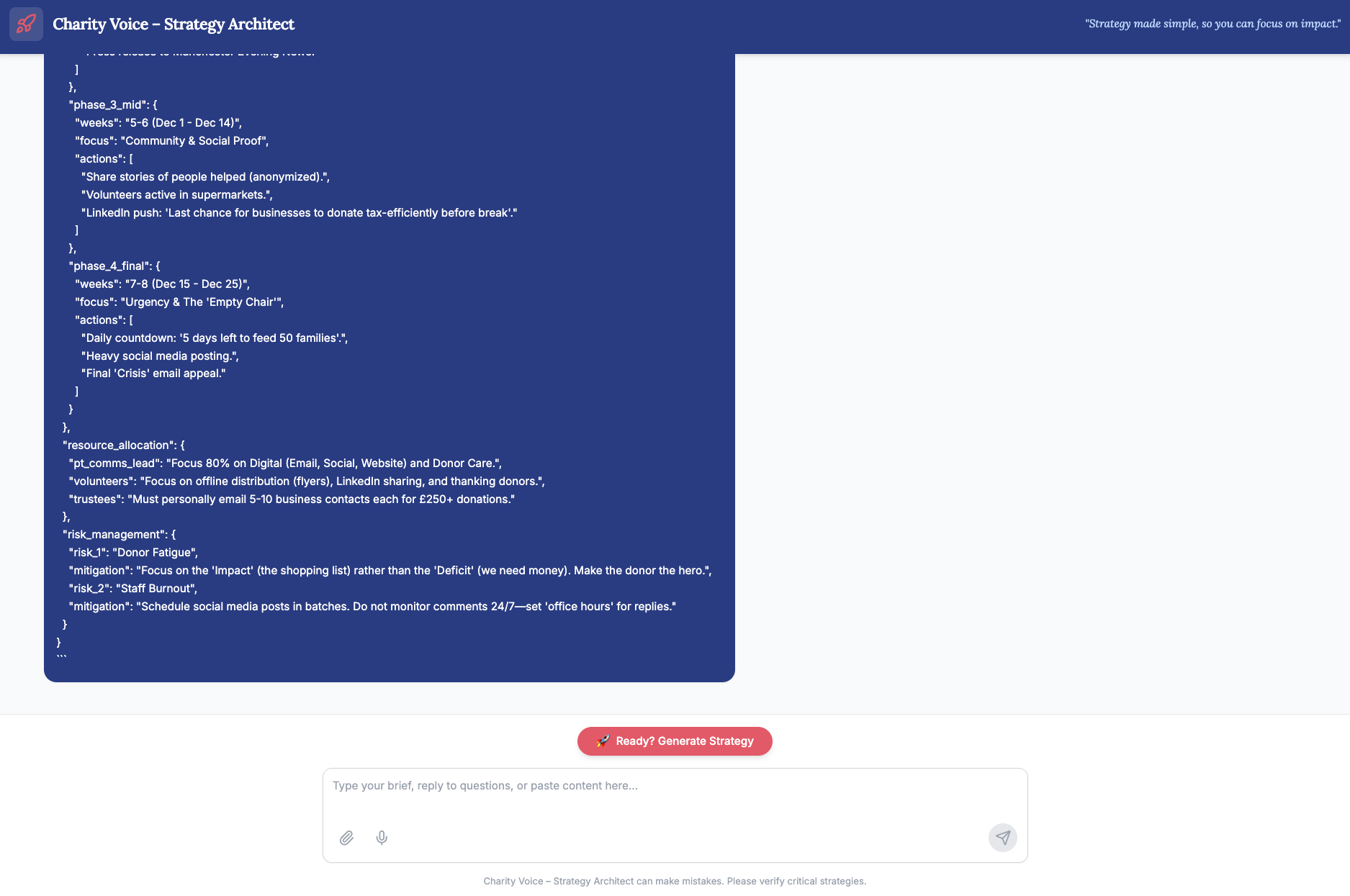
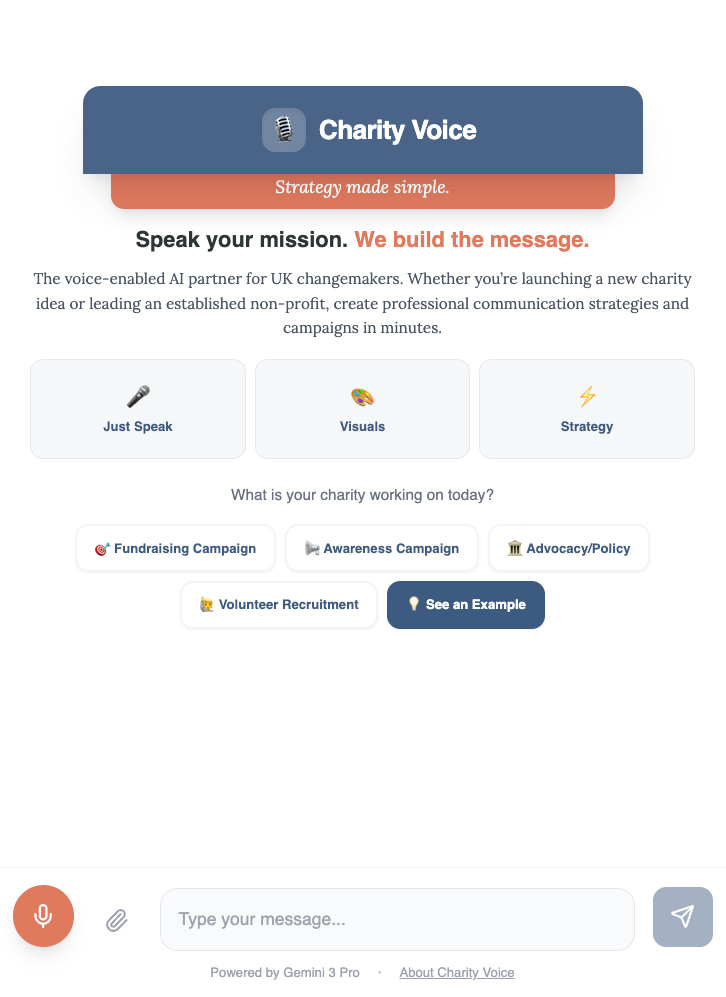
The result was Charity Voice: a voice-enabled AI strategy architect that transforms spoken campaign briefs into comprehensive communications strategies, delivered as bespoke interactive dashboards.
In 12.5 hours (10 for development, 2.5 for a recorded video walk-through and entry submission), I built something I genuinely couldn't have created before – and which wouldn’t have been possible for users even a year ago without at least a five-figure budget.
Here's what I learned.
The Background & Technical Detail
The competition 'Google DeepMind - Vibe Code with Gemini 3 Pro in AI Studio' was hosted by Kaggle, with Google DeepMind offering $10,000 in Gemini API credits to 50 winners.
Given that the December 2025 release of the Gemini 3 Pro model had caused ChatGPT to declare a code red – such was its reputed capabilities, it felt like all the excuse I needed to test it within Google AI Studio ("a free, web-based platform for quickly prototyping, building, and experimenting with Google's generative AI models like Gemini").
For the most part I used the free preview available within the studio, until what felt like a mini-crisis near the close for entry submissions, when I ran out of credits. Thankfully, I was then able to pay for use of the full version to get me over the finish line – this experiment therefore costing me a grand total of $0.06.
In terms of creation, I mainly worked with Claude's new Opus 4.5 model to ideate and produce the plan, aiming for something achievable and submittable within 10 hours that would also push boundaries and create something beyond what is possible with the models provided by other rivals. (A slighly ironic use of Claude in that respect.) About halfway through, I also used Gemini 3 Pro's own chat mode separately, as this was better for understanding and building on its capabilities and limits – bouncing ideas and using both models as project partners. More on this later.
The Breakthrough: From Text Output to Tailored Command Centres
By version 0.2 of the prototype (around hour 2/3), I had something that worked – but it wasn't distinctive. The AI was generating text-based strategies, which is exactly what every other generative AI model has been doing for two years. Useful, but not transformative.
The breakthrough came when I stopped thinking about AI as a writing tool – which would build a whole strategy document based upon my own custom knowledge base – and started thinking about it as a building tool.
What if the output wasn't a document at all? What if it was a fully interactive, visually dynamic dashboard — a "Campaign Command Centre" tailored to each charity's specific campaign?
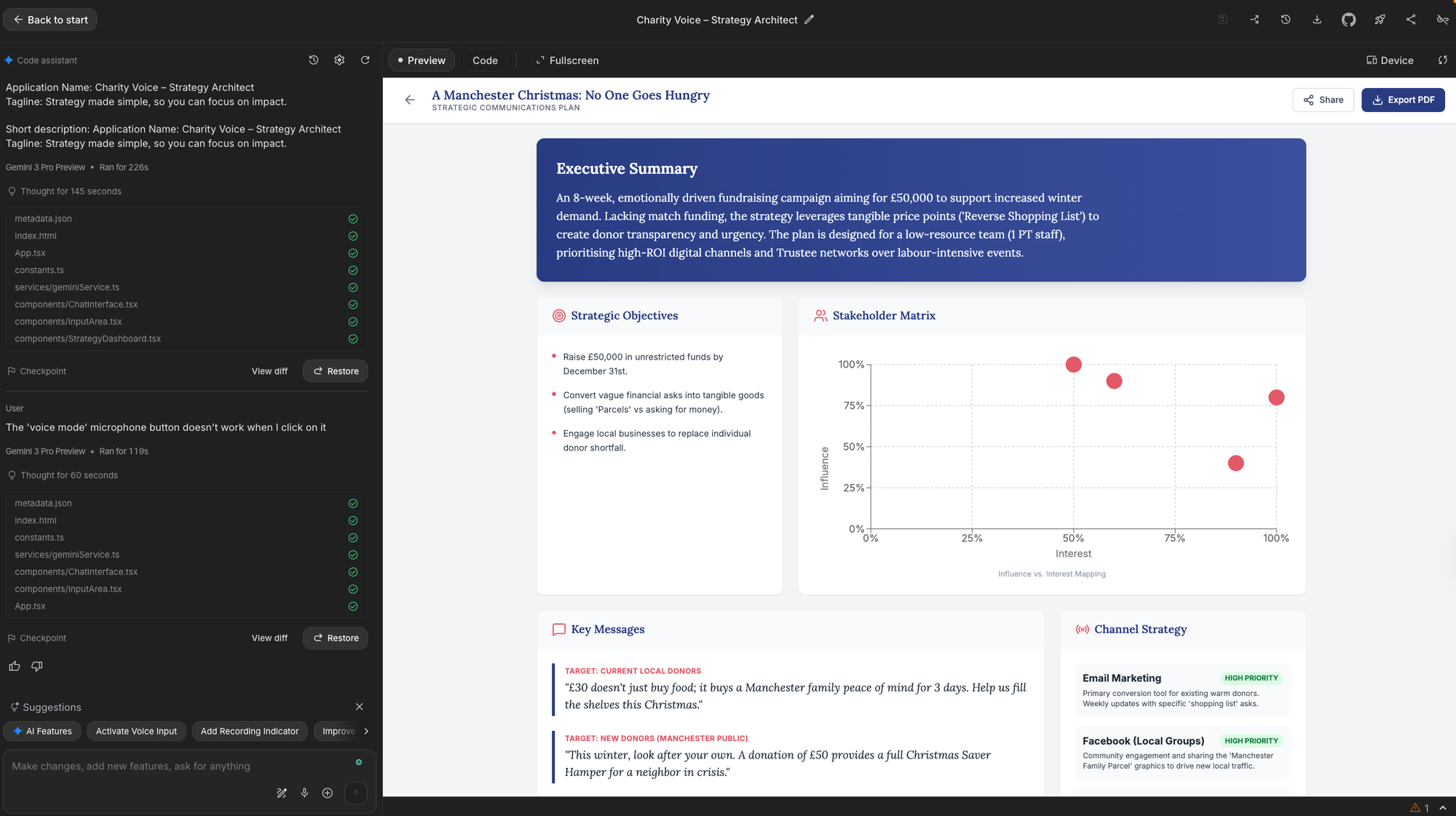
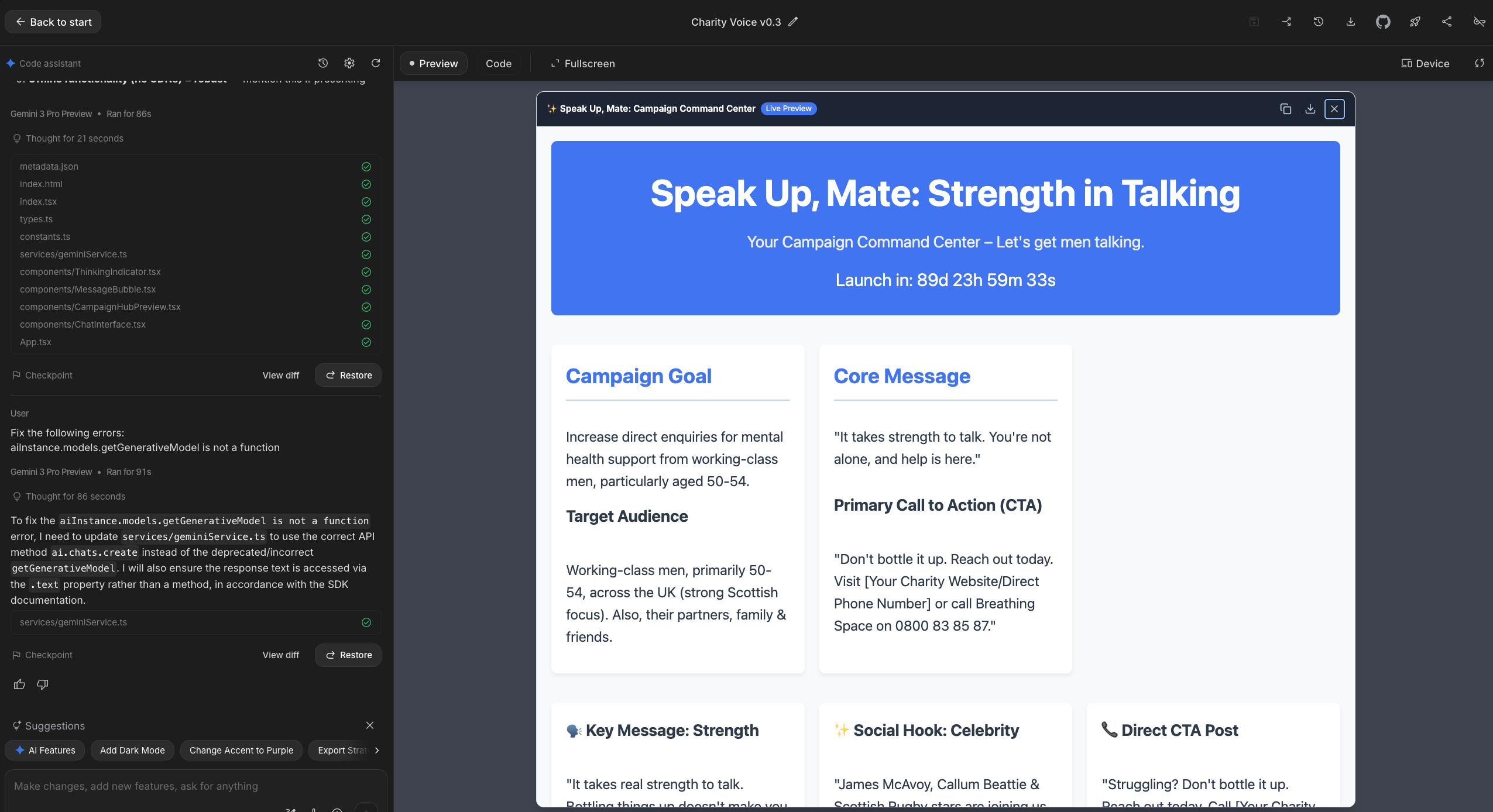
This shifted everything. When a user completes a strategy session with Charity Voice, they don't receive a Word document or PDF. They get a bespoke HTML dashboard that can include elements such as their strategic context, target audiences, a 6-week action plan, key messages, strategic rationale, etc – all presented in an interactive format they can actually use.
For the demo scenario (a Manchester food bank's Christmas appeal), the Command Centre included campaign tracking, audience breakdowns, and timeline visualisation. Other test runs generated fundraising trackers that allowed users to enter donations and see progress against targets. Each dashboard was unique, based solely on what the user had indicated they needed and the supplementary files they had attached.
The combination of voice input (speak your brief naturally, like talking to a colleague) and tailored visual output (receive a working tool, not just text) is something beyond what I've seen other generative AI alternatives offer right now. This isn't just "AI helps me write" – it's "AI helps me build tools."
What I Learned About Agentic Development Using Gemini 3 Pro
The hackathon forced clarity on what makes agentic development different from running prompts through a standard chat interface.
Agentic Code Generation Changes What's Possible
The standout capability wasn't text generation: it was Gemini 3 Pro's ability to plan multi-step solutions, generate code, and produce working outputs. The model doesn't just respond to prompts; it architects solutions (for this reason, at point I named the app as Charity AI Strategy Architect, though that ultimately felt a bit clunky).
For communicators, this represents a fundamental shift. We've spent two years learning to use AI as a writing assistant. Agentic systems such as that offered by Google Gemini 3 Pro/Gemini AI Studio open up a different possibility: AI as a tool-builder that can create bespoke applications tailored to specific needs.
Voice-First Design Removes Friction
The second breakthrough was genuinely usable voice input. Users can describe their campaign naturally – speaking rather than typing – and the AI transcribes and understands intent, even with imperfect phrasing.
This matters for accessibility. Many charity staff are juggling multiple roles; asking them to write detailed briefs adds friction. Speaking a brief while walking between meetings removes that barrier entirely. At the same time, the multimodel input allows users to type and/or upload relevant files.
Context Windows Enable Grounded Outputs
Gemini 3 Pro's 1-million-token context window allowed me to load substantial reference materials to ground the outputs in genuine sector practice rather than generic advice. I included an anonymised version of a real communications strategy I'd developed for a charity client (with all confidential information removed), which helped the AI understand what a professional charity comms strategy actually looks like.
This grounding proved essential. Without it, the outputs felt like plausible AI-generated text. With it, they felt like credible first drafts from someone who understands the sector. The structure changed: sections appeared in the order a real strategist would present them, with a decent level of detail in the right places. The quality of insights improved, too, moving from generic advice you'd find in any marketing textbook to recommendations that reflected how charity communications actually work in practice.
The Development Process: A Dual-AI Workflow
One of my key learnings was developing a workflow that used different AI tools for their relative strengths.
I used Claude Opus 4.5 (Anthropic's latest lauded model for complex work) for strategic thinking and prompt engineering — working through the system prompt architecture, developing the 4500-word prompt that defines Charity Voice's personality and methodology, and planning the overall approach. Claude excels at this kind of structured strategic work.
I used Gemini 3 Pro (in a separate window from AI Studio) for capability testing: checking what was actually possible within the platform, understanding limitations, and refining prompts based on real behaviour rather than theoretical capability. AI Studio doesn't have a built-in "chat with the model about the model" mode like some platforms (hello Replit), so running a parallel conversation proved invaluable.
This dual approach prevented the common trap of designing something elegant that the target platform can't actually execute. I'd recommend it for anyone building AI tools: use one model for thinking, another for reality-checking.
The Build Timeline
The build went through four versions across ten hours:
Version 0.1 (Hours 0–3): The process of arriving at something usable. Basic prototype: worked, but felt like standard chatbot interaction. This phase was about getting the foundations right: voice input working, basic strategy output generating, the conversation flow making sense.
Version 0.2 (Hours 3–5): Attempting to shape something genuinely helpful. I added more structured outputs and refined the conversational flow, but the changes started to feel incremental. We were getting stuck in a rut: each iteration made small improvements, but the outputs still felt like every other AI tool generating text strategies. I could sense we were polishing something that wasn't distinctive enough to matter.
Version 0.3 (Hours 5–7): The breakthrough. Rather than continuing to iterate, I stepped back and did additional research into Gemini 3 Pro's capabilities: specifically, what it could build rather than just write. This led to a complete restart with a new prompt architecture. The realisation that the output needed to be visually dynamic and engaging, not just well-written, changed everything. Deciding on a bespoke webpage format, and recognising that Gemini 3 Pro could actually generate working HTML dashboards, was the turning point. This version introduced the Campaign Command Centre concept and voice-first design.
Version 0.4 (Hours 7–8): Refined conversational flow, added quick-reply buttons, implemented the "Critical Friend" reality check.
The Annotation Mode Discovery
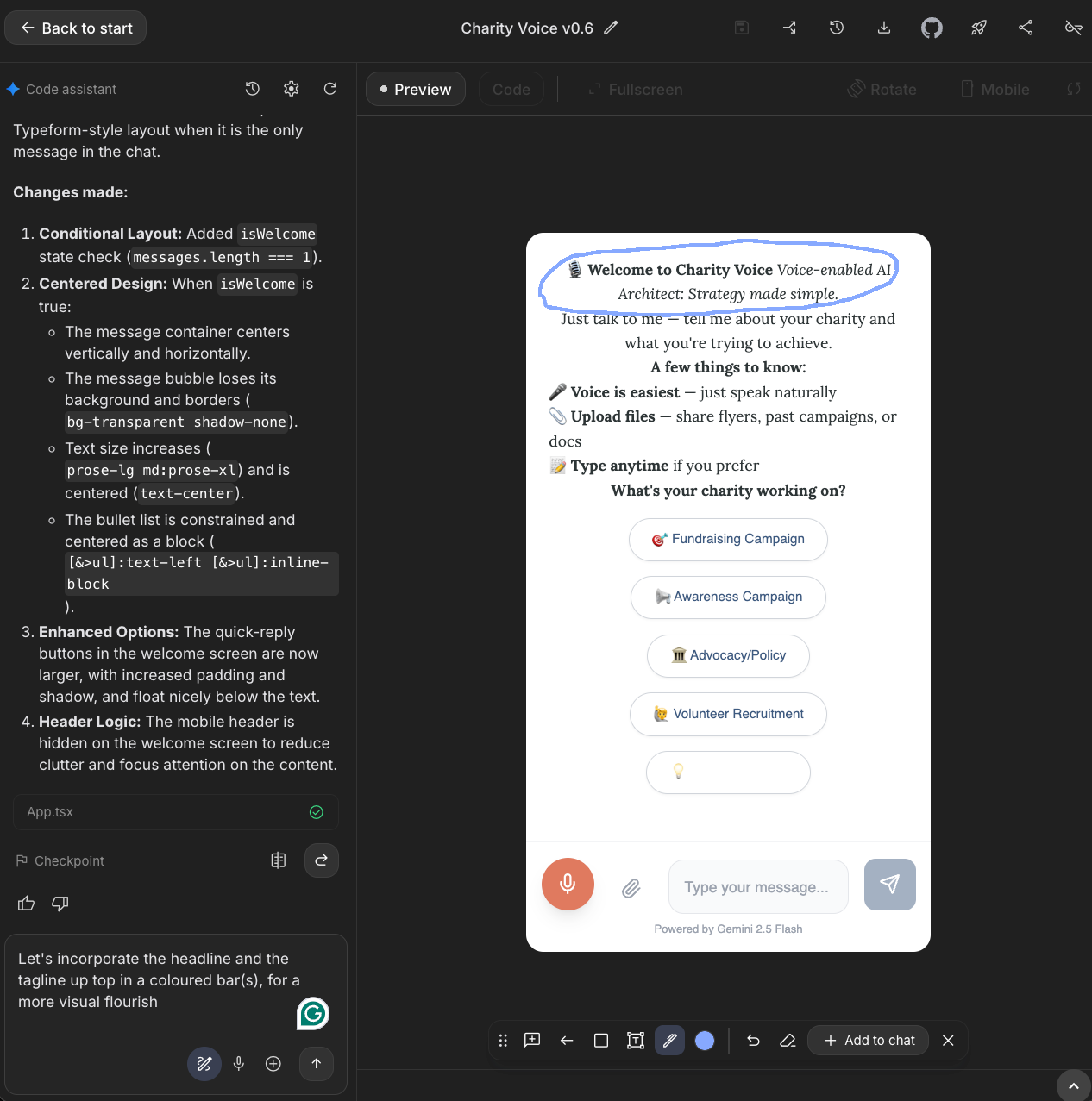
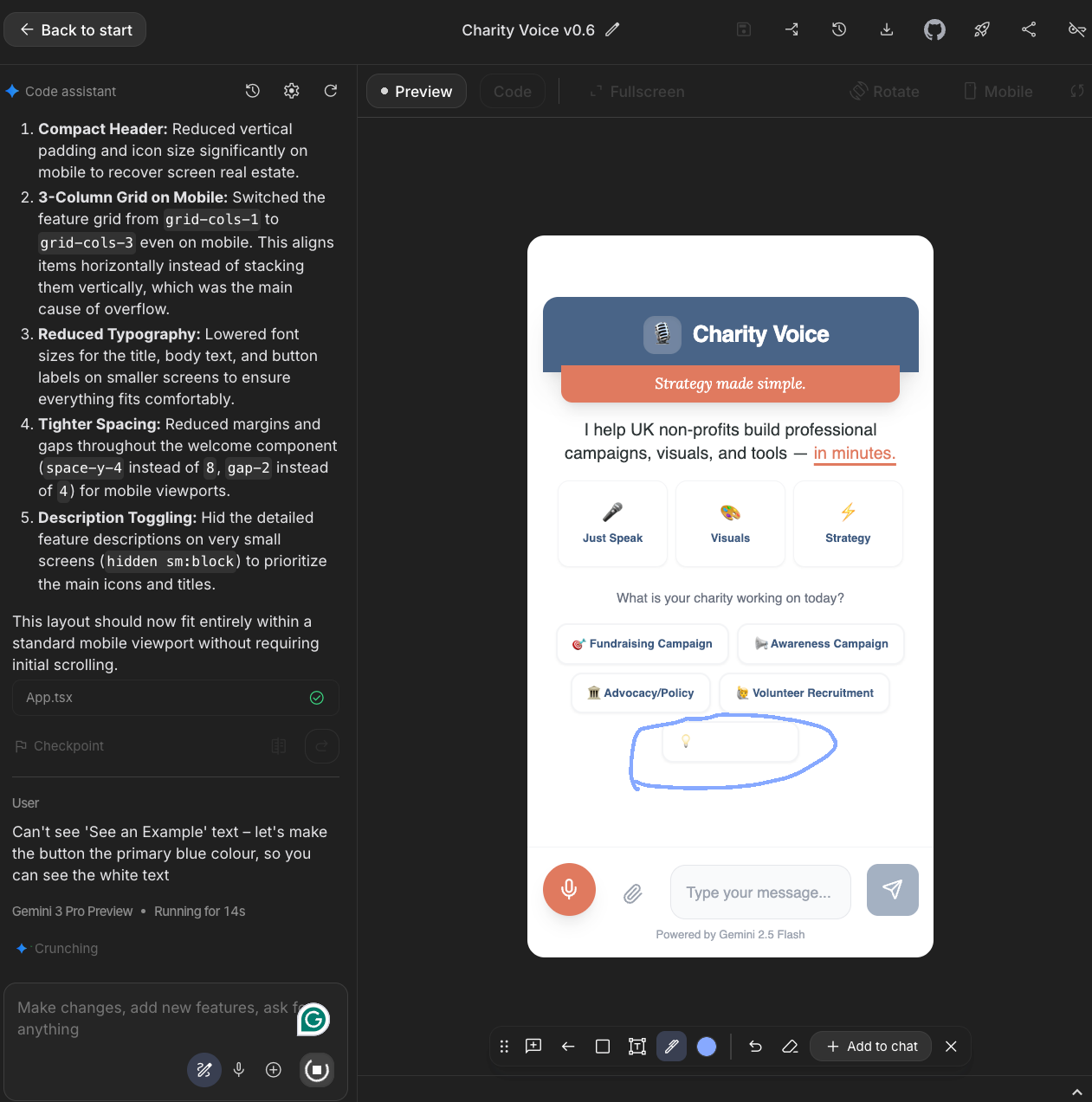
One unexpected discovery: Google AI Studio's annotation feature lets you draw directly on the preview and mark changes visually. By hour 7, I was circling interface issues and writing notes directly on screenshots rather than describing problems in text.
This became my primary method for refinement. I learned that the AI was significantly better at implementing single, visually marked changes than at processing batched text feedback. When I submitted several lines of feedback at once, not all changes would be incorporated — some would be missed or partially implemented. But when I circled a specific element and wrote "make this button larger" or "move this section above the timeline," the implementation was precise.
For visual refinement in AI Studio, annotation mode is faster and more reliable than any prompt-based approach. If you're doing similar work, I'd recommend switching to visual annotation as soon as you're past the core functionality stage.
Hours 8–10 were iterative refinement: fixing bugs one at a time, each marked visually on a fresh screenshot.
The final 2.5 hours went to video production and submission. If you're entering similar hackathons: budget this time properly. A working prototype that you can't demonstrate is worth less than a slightly rougher prototype with a compelling video. My own video efforts were less than my best as a former filmmaker, but I uploaded a quickly edited effort before I entirely lost the will to carry on...
The App Features That Matter
The Critical Friend Reality Check
If a charity's goals don't match their resources, Charity Voice challenges them constructively. Claim you'll reach 100,000 people with one part-time staff member and no budget? The AI pushes back before generating a strategy, ensuring recommendations are actually achievable.
This emerged from my real-world charity work. I've seen organisations set impossibly ambitious targets, receive strategies that assume infinite capacity, then fail to execute — or worse, burn out the founders/small teams trying. Many new charities fail or flounder because unrealistic expectations meet limited resources, leaving a profound gap between aspiration and achievement. A tool that just says "yes" to everything isn't actually helpful. It needs to be honest about what's achievable.
Grounded Sector Research
Before producing the campaign command centre, Charity Voice uses Gemini's Search integration to ground strategies in the current UK charity sector context – pulling in relevant data from sources such as the Trussell Trust on food poverty and the current Charity Commission guidance. This isn't hallucinated expertise; it's researched context.
Consultative Information Gathering
Rather than demanding a comprehensive brief upfront, Charity Voice asks smart follow-up questions one at a time – reflecting how a real consultant would conduct a discovery session. Users can respond via voice, typing, or quick-reply buttons, reducing friction at every step. This makes the process more organic and easier for those who may not have thought through every step before hand, with an aim to increase friendliness and completion rate, while providing extra unexpected insight on the way.
Quick-Reply Buttons for Faster Navigation
Alongside voice input, I built in clickable text prompts throughout the interface – campaign type selection, budget ranges, quick responses to common questions. Users can tap rather than type or speak when they prefer.
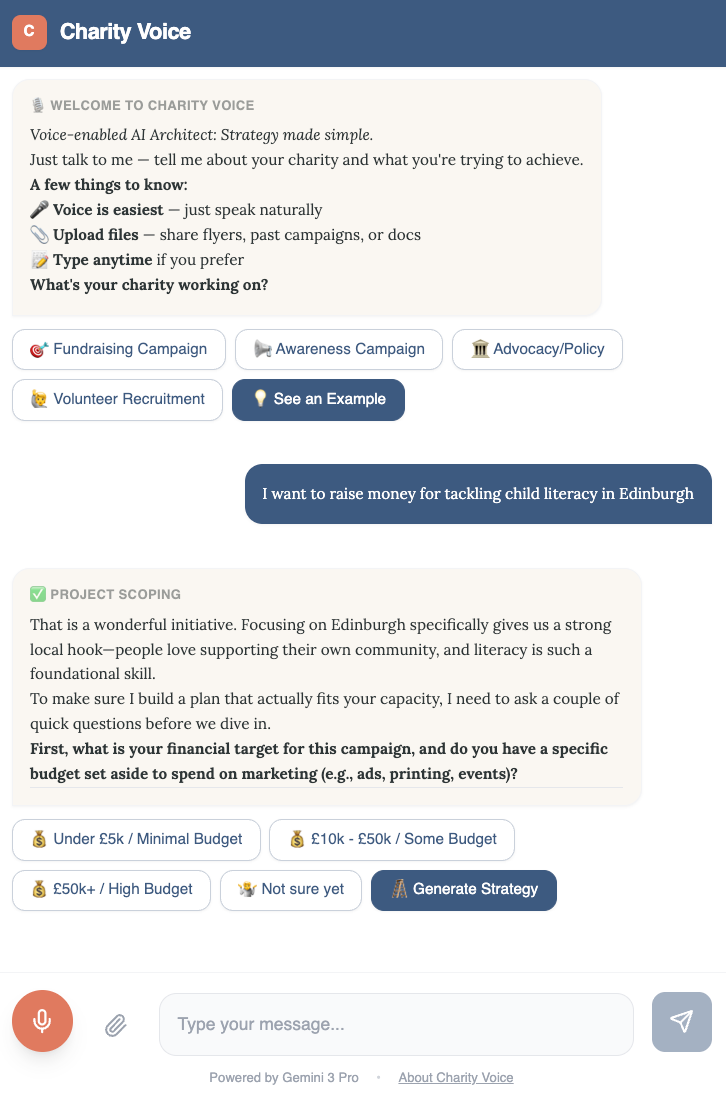
This is something I've wanted to implement in charity contexts for almost a decade. When I was working with service users during my charity leadership roles, I saw how much friction-free text input creates for people who are time-poor, stressed, or less confident with technology. Pre-set options that capture common responses make tools genuinely accessible rather than theoretically accessible.
Being able to implement this in a few hours of hackathon development – something that would previously have required significant custom development – felt like a small validation of how agentic AI is changing what's buildable.
The Honest Limitations
Platform Constraints
No Persistence (Yet): The main weakness is platform-inherent: Google AI Studio doesn't support user accounts. Users can't log in, save their work, and return to iterate over time.
There's a workaround that I quickly implemented: users can download their Campaign Command Centre as an HTML file, then re-upload it to continue refining. It works, but it's clunky. For a fully featured production tool, I'd export the code and build proper persistence elsewhere.
Prototype-Stage Limitations
Right-Sized Outputs: Because the primary output is an interactive dashboard rather than a long-form document, strategies run to approximately 1,000–2,000 words rather than the 10,000+ words of a traditional agency strategy. But this may actually be appropriate for the audience. A charity with one part-time comms person doesn't need – and can't act on – a 50-page strategy document. They need something focused, actionable, and implementable. The dashboard format forces prioritisation rather than comprehensiveness for its own sake.
Refinement Needed: This is a hackathon prototype, not a polished product. The strategic quality was solid but would need refinement for production release – it felt like there was some room to strengthen and feel less generic. Testing across fundraising, awareness, and advocacy campaigns showed the approach works; the execution needs further iteration.
What This Means for Communications Practice
I went into this experiment sceptical about whether AI could replicate strategic thinking – and realise it in an interactive format – rather than just generating plausible-sounding text. My conclusion: we're closer than I expected, with important caveats.
What worked well:
- Structured frameworks (stakeholder mapping, channel strategy, risk registers) that AI can reliably produce when given clear templates
- Sector-specific context, when properly grounded with research tools and real reference materials
- Voice input that removes barriers for time-pressed practitioners
- The "consultative" pattern of asking follow-up questions rather than demanding comprehensive briefs upfront
- Interactive outputs that go beyond documents to become working tools – this feels like the real evolution in capability
What still needs human oversight:
- Judgment calls about organisational culture and politics that don't appear in any brief
- The intrinsic sense of whether recommendations will actually land with specific stakeholders
- Strategic prioritisation that accounts for unstated constraints and sensitivities
- Quality assurance before anything goes to stakeholders or leadership
- Nuance around timing, competitive positioning, and sector dynamics
At the moment, the Charity Voice prototype is a powerful first-draft generator and strategic thinking partner, not a replacement for experienced practitioners. But for charities that currently have no strategic input – and there are thousands of them – it could function as a significant step up from nothing.
For comms leaders in larger organisations, a more interesting application might be using tools like this to democratise strategy capability across teams. If every campaign manager can generate a credible first-draft strategy in minutes, senior strategists can focus on refinement and oversight rather than starting from blank pages.
What's Next
This experiment has shaped my thinking about where AI-assisted communications is heading. In the new year, I'll be exploring AI agent-driven communications more deeply, with a focus on practical application and quick accessibility through the tools most communicators already have: ChatGPT, Claude, and Gemini.
The goal isn't to chase the latest capabilities for their own sake, but to identify what's genuinely useful for working practitioners right now.
Try It Yourself
The submission is live and publicly accessible:
- AI Studio App — try Charity Voice directly
- Demo Video — 2-minute walkthrough of the Manchester food bank scenario
Results from the hackathon judging aren't in yet. But regardless of outcome, this experiment validated something important: voice-enabled, agentic AI tools for communications strategy aren't theoretical anymore. They're buildable today.
I help communications teams move from AI experimentation to operational value. Through Faur, I offer workflow audits, implementation consulting, and capability-building workshops—grounded in the same hands-on approach you see in this content.
If you're exploring how AI could transform your communications practice, drop me a line at michael@faur.site.