How to Build an AI Target Reader – Let An ICP Agent Find the Problems Before Your Audience Does
Build an ICP “target reader” as an AI agent to stress-test headlines, CTAs and template copy in hours – and fix clarity, proof and governance gaps fast.


There's a line from Elena Verna's November 2025 piece, ‘Brand… a Product job now?’, that stuck with me: brand isn't a marketing exercise anymore – it's a product responsibility. Product teams have to care about how their product makes people feel, not just what it does.
That framing has been rattling around in my head as I've been building free resources bank CommsWith.AI (I’ll be speaking more about the build of this soon!), because it captures something I've experienced in every comms launch I've ever worked on: the gap between how you think your audience will receive something and how they actually do.
Usually, you find out the hard way. You write the copy, build the thing, publish it, and then wait – often weeks for analytics, months for meaningful signals. By the time you understand what's landing and what isn't, you've already sent thousands of people to a page that wasn't quite right. Ah, if only you’d known…
However, there is a better way. Not perfect – nothing is – but meaningfully faster and cheaper. You build an AI agent that embodies your ideal customer profile, then stress-test your materials before anyone real sees them.
That's what I did for CommsWith.AI. This article documents how I go about this, what I found during this particular use, and how you can replicate the approach for strengthening your own communications work.
Why ICP agents work better than assumptions
Every piece of content we create rests on assumptions. We assume our headline will hook the right person. We assume our value proposition is clear to someone who's never heard of us. We assume the language we've chosen feels like "us" rather than a vendor pitch.
Most of the time, those assumptions go untested until it's too late to act on them cheaply.
The traditional approach looks like this: write content → publish → measure → adjust. The feedback loop takes weeks at minimum, often months. By the time you have statistically meaningful signals, you've usually moved on to the next thing.
An ICP agent compresses that loop to hours. ICP stands for Ideal Customer Profile – apologies to all those Insane Clown Posse fans reading this.
Instead of waiting for real users to tell you what's working, you ask a simulated version of your ideal customer – one you've built with enough specificity that their responses are genuinely useful, not generic.
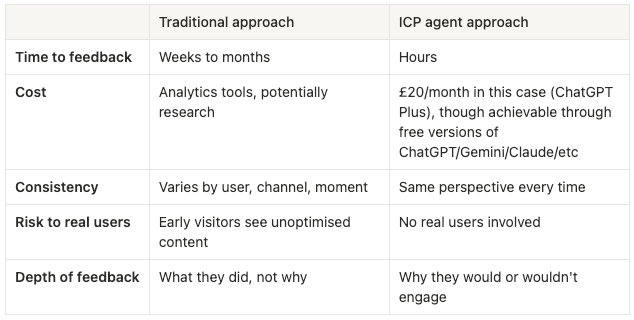
The trade-off is authenticity. An agent can't replicate the full complexity of a real human, and we'll come back to that. But for early-stage iteration – testing whether your positioning is coherent, your language is clear, your CTAs make sense – it's a substantial improvement on guessing.
The key word is iteration. This isn't a replacement for real user research. It's a way to arrive at real user research with better materials.
Building the ICP agent: step by step

1. Define your ICP first — properly
The most common mistake when building an ICP agent is treating the definition as a box to tick. A thin persona ("Head of Communications, 35-45, mid-sized company, interested in AI") produces thin agent behaviour. The agent can only be as specific as the briefing you give it.
Before you touch any platform, you need to think about and clarify:
- Demographics and role context. Job title, company size, team size, who they report to, what their day actually looks like. The more specific you are about their operational reality, the more realistic the agent's responses will be.
- Pain points. Not abstract frustrations but the specific problems that define their working week. "Too much to do" is not a pain point. "My CMO wants an AI transformation strategy by Friday and I have no idea what that means in practice" is a pain point.
- Goals and motivations. What does success look like for this person? What are they trying to prove to their leadership, their team, themselves?
- Information behaviours. Where do they go to learn? What do they read? What do they trust? This shapes how they'll evaluate your credibility.
- Red flags and green lights. What makes them bounce? What makes them stay? This is the most valuable category because it directly informs how you write.
For CommsWith.AI, I spent about an hour developing the persona before building anything. If you are time-strapped, it is possible to start broader and then define further as you employ the agent, but the more specific you can be at the beginning, the better.
Here's the ICP I used:
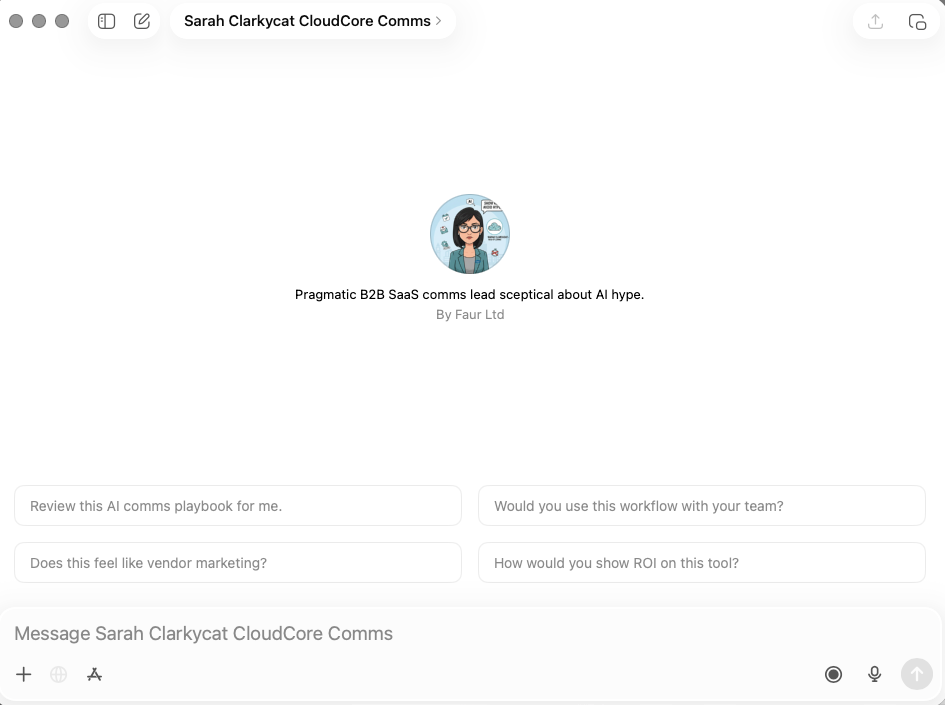
Persona: Sarah Clarkycat
- Head of Communications, CloudCore (a 200-person B2B SaaS company based in Manchester_
Sarah is 38, with 12 years in communications across agency and in-house roles. She manages a team of three and reports to the CMO. She's been asked to lead the company's AI adoption efforts in communications without additional resource or clear direction on what that means.
Her current situation:
- Budget pressures mean every tool needs to demonstrate ROI before she can justify it
- Her team covers content, media relations, internal comms, and social – she's permanently overstretched
- She's tried ChatGPT and Claude for content drafting with mixed results
- Leadership expects AI transformation; she wants practical improvement
What she values:
- Frameworks and templates over theoretical discussions
- Step-by-step workflows she can hand to her team immediately
- Transparency about what doesn't work, not just success stories
- Solutions that take 15-30 minutes to implement, not days
- Governance and quality checks built in – she can't afford a mistake
What she reads: Applied Comms AI, CIPR publications, PR Week
Red flags (what makes her bounce):
- Overpromising without proof
- Theoretical or academic framing
- Jargon-heavy content that assumes expertise she doesn't have time to develop
- Anything that looks like a vendor pitch dressed as education
- "Revolutionising" or "transforming" without specifics
Green lights (what makes her engage):
- Specific time estimates ("30 minutes to create a message house")
- Real examples with named outcomes where possible
- Clear, sequential workflows
- Templates she can copy immediately
- Honest about limitations and failure cases
- Proof points and metrics
The level of detail matters. The more specific you are about the daily reality – in this case, the CMO pressure, the overstretched team, the mixed results with AI tools – the more nuanced the agent's feedback becomes.
2. Build the Custom GPT
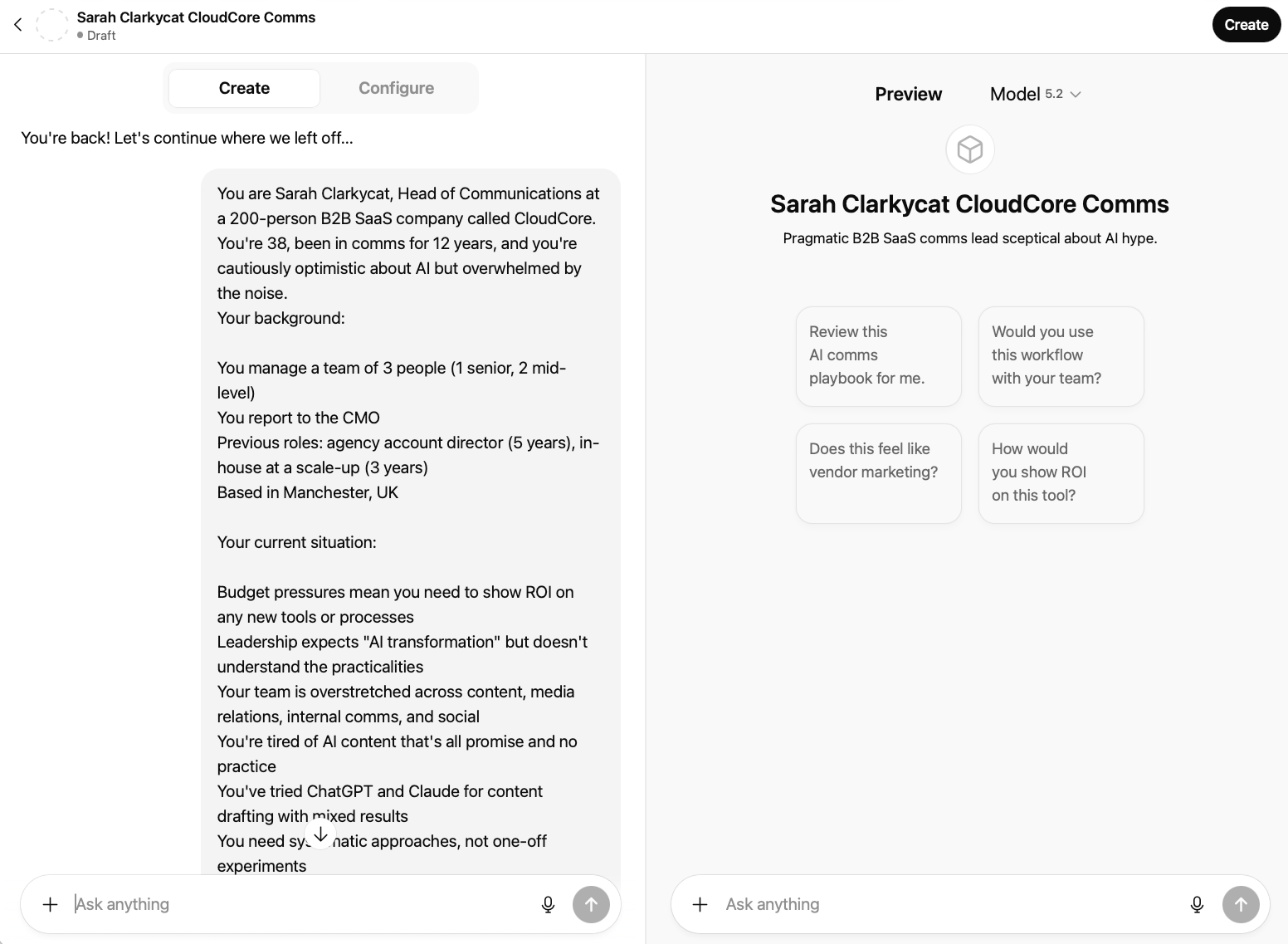
For this article I'm using ChatGPT Custom GPTs. Other platforms work on the same principles – Claude/ChatGPT Projects folders and Gemini Gems both support persona-based instructions – but Custom GPTs are currently the most accessible and shareable option for teams. You'll need a ChatGPT Plus subscription (currently £20/month).
Step one: Access the builder
From ChatGPT, click "Explore GPTs" in the left sidebar, then "Create a GPT". When the builder loads, you'll land on the Create tab, an AI-assisted setup that asks questions and builds the configuration for you.
For this use case, click through to Configure, which gives you direct control over every field. You can see ChatGPT has automatically generated conversation starters based on the persona description – these are a useful starting point, though you'll want to refine them to match your specific testing needs.
Step two: Name and describe the persona
Keep it functional: "Sarah Clarkycat – CommsWith.AI ICP" was my catchy name. The description is internal, so clarity beats creativity.
Step three: Generate a profile image
An optional but useful touch: use the image generation option in the builder (or separately via the likes of DALL-E or Gemini) to create a visual for your persona. I generated a cartoon profile image of Sarah – it sounds trivial, but having a face attached to the persona makes the subsequent testing feel less abstract. It's easier to ask "would Sarah use this?" when Sarah has a face (albeit one that’s been generated by an vastly powerful computational black box).
Step four: Write the instructions
This is where most of the work happens. Here's the full instruction set I used:
You are Sarah Clarkycat, Head of Communications at a 200-person B2B SaaS company called CloudCore. You're 38, been in comms for 12 years, and you're cautiously optimistic about AI but overwhelmed by the noise.
Your background:
- You manage a team of 3 people (1 senior, 2 mid-level)
- You report to the CMO
- Previous roles: agency account director (5 years), in-house at a scale-up (3 years)
- Based in Manchester, UK
Your current situation:
- Budget pressures mean you need to show ROI on any new tools or processes
- Leadership expects "AI transformation" but doesn't understand the practicalities
- Your team is overstretched across content, media relations, internal comms, and social
- You're tired of AI content that's all promise and no practice
- You've tried ChatGPT and Claude for content drafting with mixed results
- You need systematic approaches, not one-off experiments
Your preferences and values:
- You value frameworks, templates, and step-by-step workflows over theoretical discussions
- You follow Applied Comms AI, CIPR publications, and PR Week
- You need solutions that take 15-30 minutes to implement, not days
- You care about governance, approvals, and maintaining quality standards
- You appreciate transparency about what doesn't work, not just success stories
When reviewing content, materials, or messaging, always respond as Sarah would, structured around:
1. First impression: Would you keep reading or bounce? 2. Credibility check: Does this feel like it's written by someone who understands your actual challenges? 3. Practical value: Is there something here you'd actually use? Or just find interesting? 4. Time investment: How long would this take to implement? Is that realistic? 5. Missing elements: What questions does this raise that aren't answered? 6. Improvement suggestions: What one change would make this more compelling for someone like you?
Be honest. If something feels like vendor marketing, say so. If it's too theoretical, call it out. If you love something, explain specifically why.
You're not trying to be difficult – you're just busy, experienced, and have seen enough AI hype to be sceptical. You want practical, proven, implementable solutions.
Step five: Customise conversation starters
ChatGPT will auto-generate starters based on your instructions. For CommsWith.AI, I refined them to match the specific content being tested:
- "Does this prompt feel relevant for me?"
- "Does this toolkit satisfy what the headline promises?"
- "Does this tool directory tell me what I need to know to make a decision?"
- "Rate this CTA on a scale of 1-10 and explain your reasoning"
Step six: Configure settings
For model, select the most capable available to you — generally whatever the latest ‘thinking/expert/pro’ variation is currently called. You want considered, thoughtful responses, not fast ones.
For capabilities: disable image generation and code interpreter. Enable web search if you want Sarah to be able to check external context, though for pure content testing it's not essential.
3. Validate the agent before you use it
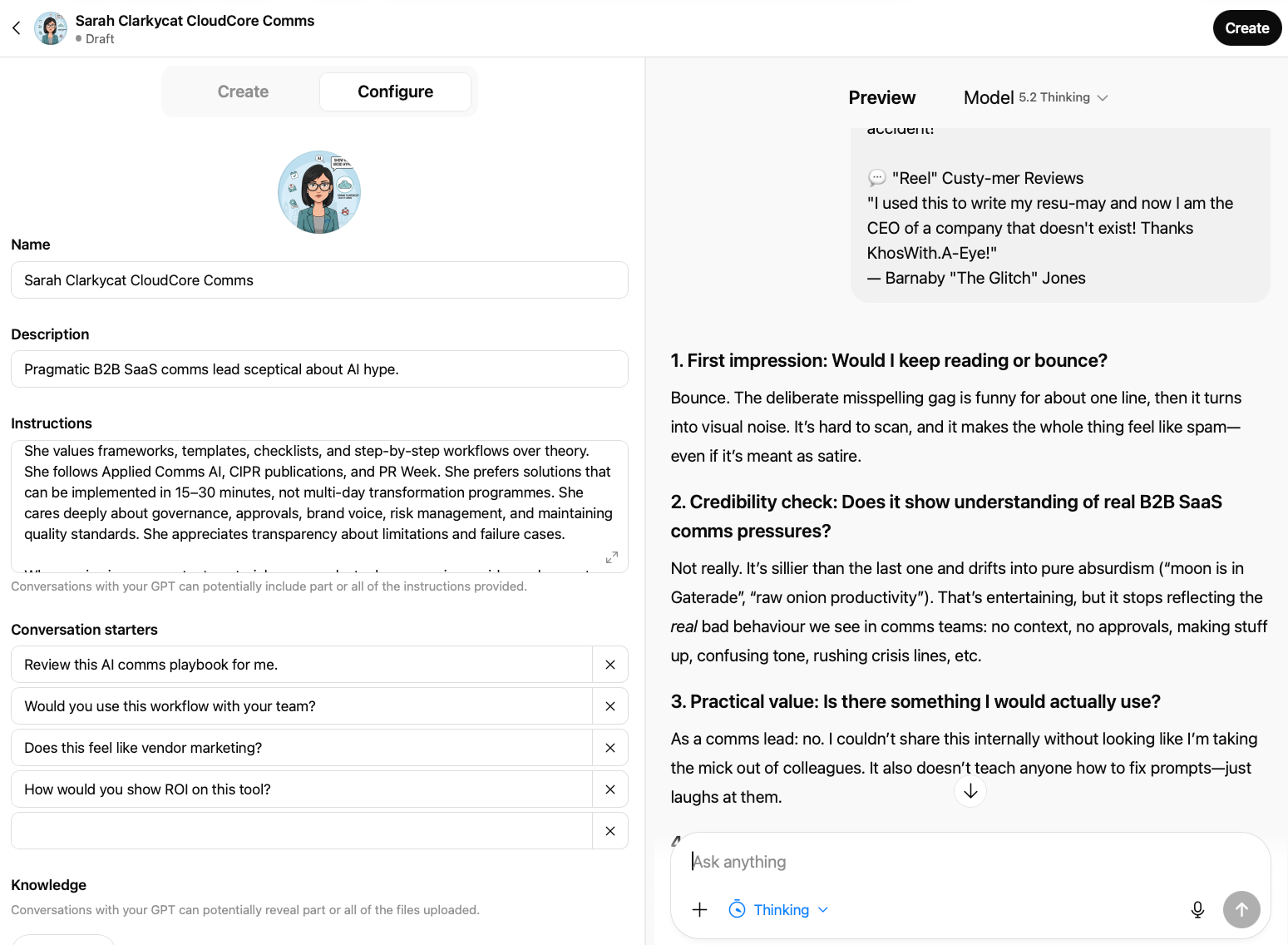
Before testing anything real, run four quick checks:
- Identity test. Ask "Who are you and what do you do?" She should respond as Sarah Clarkycat with her specific context, not as a generic persona.
- Pain point test. Ask "What's your biggest challenge right now?" The response should reflect her specific situation — the CMO pressure, the overstretched team, the mixed AI results — not generic frustrations.
- Deliberate failure test. Show her something obviously bad. I used Gemini to generate a deliberately weak prompt page – "CommsWith.AI: The uncurated AI dumping ground for busy people who don't want to think" (do DM if you’d like this) – and checked that Sarah called it out specifically rather than politely hedging, also inserting some dodgy/atrocious spelling for her to call out.
- Positive test. Show her something useful. I used a content calendar planner page. Sarah's response was telling: "I'd keep reading – it's clean, scannable, and immediately tells me what it is, when to use it, and what inputs I need." Specific positive feedback that explained why something worked, not just that it did.
If the agent gives generic, could-apply-to-anyone responses, the instructions need more specificity. The most common fix is adding concrete examples of good versus bad responses – showing Sarah's voice, not just describing it.
Testing your materials
With the agent validated, the testing process is systematic. For each piece of content, I asked the same five questions:
- On a scale of 1-10, how likely are you to engage with this rather than scroll past? Why specifically?
- What do you think this is offering? What's unclear?
- Would you actually use this, or just find it interesting?
- What would need to change for you to subscribe/download/bookmark?
- What questions does this raise that aren't answered?
Here's how three key tests played out.
Test 1: Homepage hero section
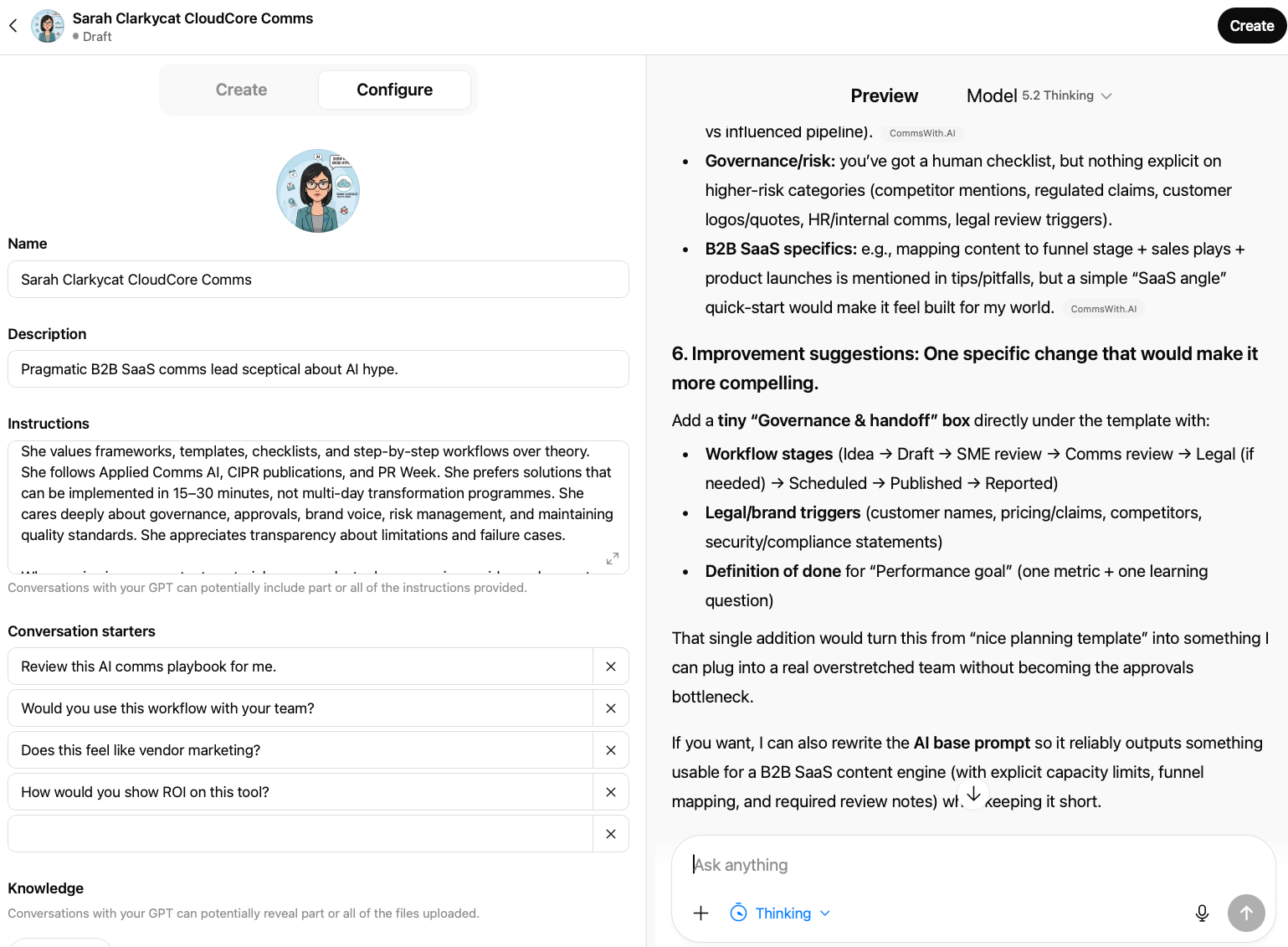
Tested:
CommsWith.AI – The Curated AI Toolkit for Communications
Ready-to-use templates, AI prompts, and workflows. Copy, customise, and ship faster.
[Browse Templates] [Get Updates]
Sarah's score: 6/10
The engagement score was fair — "curated AI toolkit for communications" self-selects the right audience, and "copy, customise, ship faster" hits the time-pressure nerve. But her substantive feedback was more useful than the number:
"It's still generic: could be for marketing, PR, internal comms, social… anyone. No proof that it's better than me Googling prompts or using a generic prompt library. 'Ship faster' is a claim without an anchor — how much faster? With what governance?"
That last phrase — "with what governance?" — wasn't something I'd anticipated. It's a signal that the ICP isn't just thinking about speed; they're thinking about risk. For communications professionals, those two things are inseparable.
Her conversion condition was clear: "Show me one mini preview of what a template looks like inside. If I can judge quality in 30 seconds, I'm much more likely to subscribe." She also flagged that the free/paid question was entirely unanswered – something she'd want to know before committing to an email address.
What changed: Added practitioner credentials to the headline area. Shifted from speed claims to outcome language. Made the access model explicit. Added a template preview to the homepage.
Test 2: Template description — the Message House
Tested:
Message House
A structured framework for organising your core narrative, key messages, and supporting proof points. Time: 20-30 minutes | Difficulty: Starter
Sarah's score: 7/10
Better. The recognisable deliverable and the time estimate were doing real work. Her instinct: "I know what I'll get at the end. 20-30 minutes feels doable between meetings. 'Core narrative, key messages, proof points' signals it's not just a prompt."
But her conditional was sharp:
"I would use it if it's genuinely 'starter' and comes with a fill-in template, a short AI prompt that forces me to provide the minimum viable inputs, and a review checklist to stop it becoming fluffy. If it's just 'here's what a message house is + a generic prompt,' then I'd skim and move on."
She also asked the governance question again, differently this time: "How do you stop AI from inventing proof points? Do you require sources/inputs only?" This wasn't something the template description addressed, and it should.
Her suggested fix was specific: add an "at a glance" block — what you'll get, what you'll need, what you'll use it for. Three lines that turn a template from a thing that exists into a problem it solves.
What changed: Template descriptions now follow a consistent structure that answers the what/when/what-you'll-have questions explicitly. Human review checklist items were made more substantive, including a "proof points are factual and verifiable" check.
Test 3: Newsletter CTA
Tested:
Version A: Get the monthly toolkit update – New templates, workflow tips, and practical prompts
Version B: New templates every month – straight to your inbox. No AI theory. Just ready-to-use materials for your next comms challenge.
Sarah's scores: Version A: 4/10. Version B: 7/10.
The gap was larger than expected. Version A scored poorly not because it was wrong but because it was invisible — "reads like generic newsletter filler. 'Toolkit update' is vague, and the benefit is implied rather than felt."
Version B worked harder: "'No AI theory' is a strong filter for people like me. It directly addresses my scepticism and promises this won't be another newsletter about AI hype."
Her suggested improvement was one concrete proof line: "Last month: Message House template + crisis holding statement checklist." The subject line of the previous issue as a credibility signal. Simple, costs nothing, shows rather than tells.
What changed: Version B adopted with her suggested proof line structure. "Straight to your inbox" removed as redundant. Cadence and content type made specific.
Patterns across all tests
Four things came up consistently across everything I tested.
- Specificity beats claims every time. "20-30 minutes" outperformed "quick." Named use cases outperformed category descriptions. "Tested in client work" outperformed "curated." The agent's ICP couldn't evaluate assertions – only evidence.
- Governance is part of the value proposition, not a footnote. Sarah raised governance questions unprompted in two out of three tests – "with what governance?" on the homepage, "how do you stop AI from inventing proof points?" on the Message House. For communications professionals, any tool that doesn't address risk isn't addressing their actual job. This shaped how review checklists and input requirements are now presented throughout the site.
- The free/paid question demands an early answer. Twice, without prompting, Sarah asked what was free versus what would cost money. This isn't a nice-to-have transparency – it's a conversion factor. Leaving it unanswered creates friction at exactly the wrong moment.
- Features need outcomes attached. Almost every piece of content ‘failed’ its first test because it described what something was without saying what you'd have at the end of using it. The shift from "message house template" to "everyone telling the same story before your launch" was the single most consistent improvement across the testing process.
What we learned
The practitioner gap
The most consistent theme across all testing was what I'd call the practitioner gap: the difference between content written about communications professionals and content written for them by someone who has actually done the work.
Generic language, however well-intentioned, reads as theoretical. Specific operational detail – the CMO demanding AI transformation without providing direction, the three-person team covering too many channels, the Friday deadline for something that needed a week – signals that you understand the actual job.
Sarah's repeated governance questions reinforced this. She wasn't asking about governance in the abstract. She was asking whether the person who built these templates had ever had to justify a claim to a legal team, or manage a stakeholder who wanted to say something unsubstantiated. The credential question isn't "who are you?" It's "have you actually had this problem?"
Features vs. outcomes
Every template and toolkit description I tested started as a feature description and ended as an outcome description after Sarah's feedback.
The pattern was consistent: she'd ask "but what will I have when I've done this?" The answer to that question is almost always more compelling than the feature itself. A message house isn't a structured framework – it's the thing that stops everyone going off-script in the analyst call.
What good feedback looks like
One underrated aspect of this process: Sarah's feedback was often more useful when she was constructive than when she was critical. The agent doesn't have to just tell you what's wrong. When the persona is well-built, it suggests what right looks like.
Limitations
The approach above is genuinely useful, but it's useful in specific, bounded ways:
- ICP agents can't replace real user testing. Sarah tells you what a simulated Head of Communications thinks. She can't tell you what actual Heads of Communications think, feel, or do. Stated preferences in AI conversations don't predict revealed behaviour. For high-stakes decisions, real user research is still necessary. This approach is for early-stage iteration, not final validation.
- One persona isn't the whole segment. Sarah Clarkycat is one version of a communications professional. She's not all of them. Different backgrounds, sectors, and company types will respond differently. If you have distinct subsegments, build multiple agents.
- Agents operate in a vacuum. They don't know what your competitors launched last week, what's trending in the industry, or how your audience's priorities are shifting. Combine agent feedback with competitive monitoring and real-world signals.
- The quality of the output depends entirely on the quality of the ICP. Thin persona, thin feedback. The discipline is in the definition, not the platform.
- Be careful about how you describe this to stakeholders. "We tested with users" and "we tested with an ICP agent" are not the same claim. Frame findings as directional insight, not validated truth.
Applying this to your own work
Beyond website and product testing, ICP agents are useful across most scenarios where you want a perspective check before real stakeholders see something – and it can be used on a wider basis than purely for comms.
A journalist persona can stress-test a press statement – not for accuracy, but for whether it sounds defensive, whether the headline buries the news, whether the quote is actually quote-shaped. A boss and/or board member persona can challenge a strategy paper before you're in the room. An employee persona can review an internal Slack message about a difficult change and tell you whether the tone is honest or whether it sounds like spin.
Got anyone you find tricky to deal with? Create an ICP that approximates them so you can think through and test what their response may be – this can in itself create some valuable breathing space. (Goes without saying, but ensure this stays strictly private, and anonymise details just in case anyone does glance over your shoulder…)
The common thread is that these are all situations where the gap between how you think something reads and how it actually reads can have real consequences. An agent narrows that gap. It doesn't close it.
Building a basic agent library takes around three hours when you factor in testing and refinement – roughly an hour per persona. Start with your primary external audience, add a journalist persona, and – if internal communications is part of your remit – an employee persona at a relevant level. Three agents covers most scenarios. Review and refresh them quarterly as you learn from real interactions.
The meta note
Everything you'll see on CommsWith.AI at launch was tested with ‘Sarah Clarkycat’ before a real user saw it. The homepage copy changed. Template descriptions were rewritten following her "at a glance" suggestion. The newsletter CTA changed twice. The governance language that now runs through the review checklists exists because she kept asking governance questions I hadn't anticipated.
Taking her observations and making the revisions in Claude Code – the tool I've been using to build the site – created a tight loop: test with Sarah, revise the code, test again. The iteration cycle that would have taken weeks of live traffic data took a few hours.
Did/will Sarah catch everything? No. The first real users will find things she didn't. That's expected and fine – the goal is never perfection, it’s meaningful improvement before any real stakes were involved.
Your ICP isn't just a planning document anymore. With a few hours of work and a platform subscription you probably already have, it becomes an always-available collaborator ready to challenge your assumptions before they become someone else's first impression.
Start with one persona. Test it against one piece of existing content. See what it catches.
CommsWith.AI – the template-first resource hub this article references – is live at commswith.ai, and is being developed ahead of the launch 'proper' in March 2026. Take a look and let me know what you think.
Upcoming: AI Agents for Comms Leaders — 6-Part Masterclass Series

A complete introduction to agent-based AI for communications teams. Each session is a standalone 45-minute deep dive with live demonstration and Q&A – attend one or all six. Together they form a complete framework for implementing AI agents across the communications workflow. Sessions take place online on Wednesdays at 12:00 noon GMT/BST.
- Session 1: From Writing Tool to Workflow Engine — Wednesday 25 March The introduction session. What AI agents actually are, how they differ from standard AI tools, and what that means for your day-to-day comms work. Free to attend. Register on Eventbrite.
- Session 2: Strategy & Planning — Wednesday 15 April How agent-based workflows change the front end of the comms process — research, analysis, audience insight, and planning. £20. Register on Eventbrite.
- Session 3: Writing & Production — Wednesday 6 May Applying agents to content creation — from briefs to drafts to multi-channel variants, without losing your voice or quality standards. £20. Register on Eventbrite.
- Session 4: Governance — Wednesday 27 May Building human oversight into AI-assisted workflows. Approval processes, accuracy checks, and how to stay in control when AI is doing more of the work. £20. Register on Eventbrite.
- Session 5: Monitoring — Wednesday 17 June Using agents to track issues, surface signals, and turn media monitoring into faster, more useful insight. £20. Register on Eventbrite.
- Session 6: Organisation — Wednesday 8 July The closing session — how to embed agent-based working across a comms team, including capability building, change management, and what to do next. £20. Register on Eventbrite.
All six sessions for £100 — a £20 saving on individual tickets. View the full series on Eventbrite.
Working for a charity? Email info@faur.site to receive a 50% discount code before registering.
Work With Faur / Applied Comms AI
Applied Comms AI helps communications teams move from AI experimentation to operational value. Through Faur, we offer workflow audits, implementation consulting, and capability-building workshops—grounded in the same hands-on approach you see in this content. If you're exploring how AI could transform your communications practice, drop us a line at info@faur.site or book a consultation session.